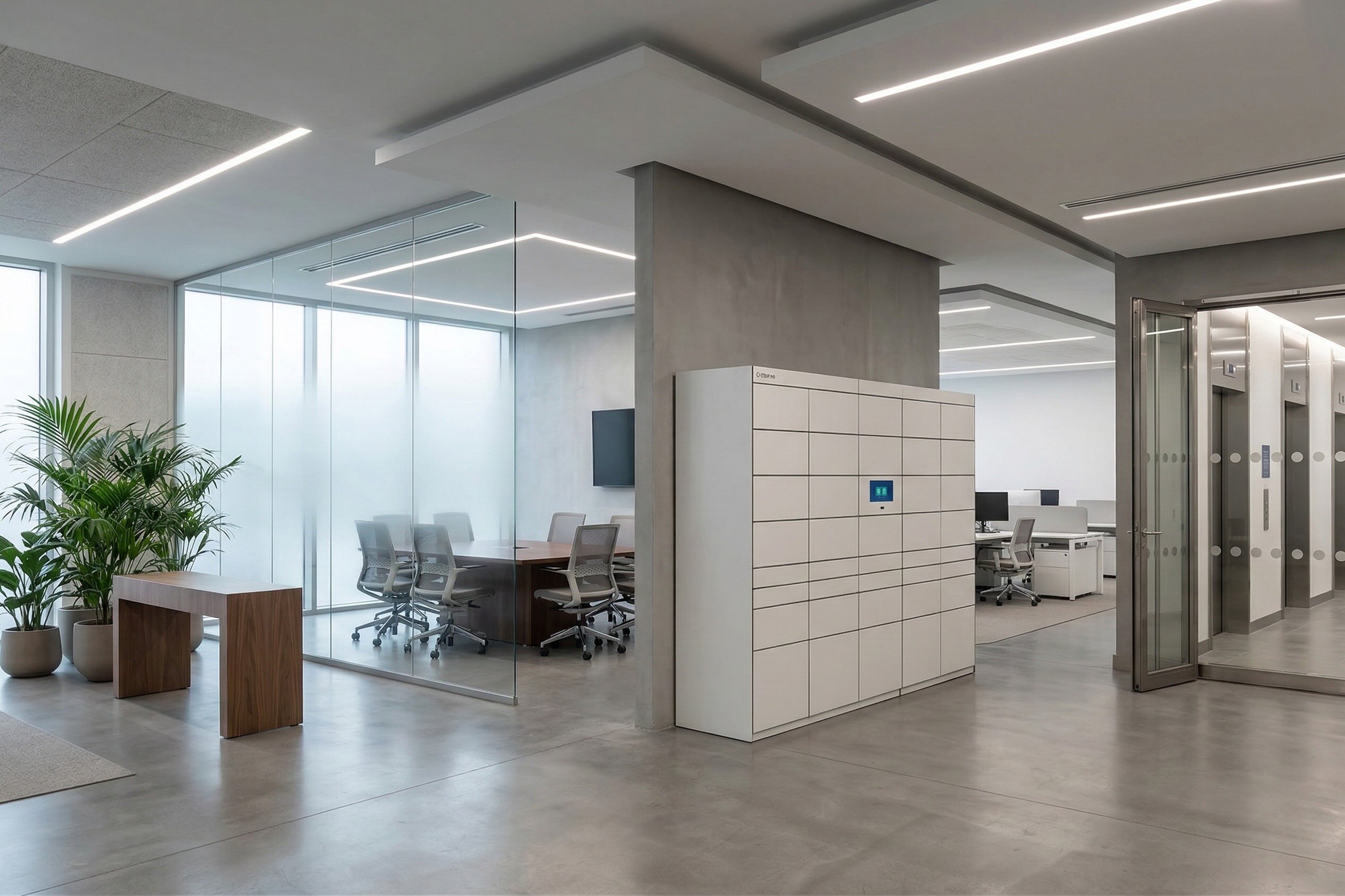
Most corporate offices are digitizing in the wrong order. Facility leaders are pouring budget into occupancy sensors, HVAC analytics and access control platforms, while the everyday operational flows — packages piling up at reception, IT devices handed over by email, internal mail lost between floors — remain stuck in 2015. The result is a paradox: buildings that are technically "smart" but workplaces that feel manual, frustrating and opaque to the people who use them every day. This guide clarifies the difference between Smart Building and Smart Workplace, explains why corporate leaders keep confusing the two, and lays out the four-layer digitization roadmap that actually generates measurable ROI in 2026.
A Smart Building is a physical asset optimized through technology: HVAC automation, energy management, lighting control, occupancy sensors, access control, building management systems (BMS). Its primary goal is operational efficiency of the infrastructure — reducing energy consumption, extending asset lifecycle, complying with ESG reporting.
A Smart Workplace, on the other hand, is a digital layer built on top of the building that optimizes how people use the space: desk booking, meeting room management, package handling, IT asset lifecycle, catering flows, visitor management, locker services. Its primary goal is operational efficiency of the people and the processes.
The confusion costs money. According to Deloitte's Real Estate Outlook, over 60% of corporate real estate leaders in Europe report that their building technology investments are not translating into measurable improvements in employee experience or operational productivity. The reason is simple: digitizing the building without digitizing the workplace creates a shell of efficiency around manual processes.
In 2026, three forces make this distinction urgent:
Treating Smart Building and Smart Workplace as the same thing leads to one of two failures: either you over-invest in infrastructure technology that employees never notice, or you under-invest in the operational layer that defines their daily experience.
A mature corporate office in 2026 is digitized across four distinct layers. Each layer has its own owners, KPIs and technology stack. Skipping one or building them out of order is the most common reason digital workplace initiatives fail.
Layer 1 — Access and identity. This is the foundation: who enters the building, when, and with what permissions. Technologies include digital access control, mobile credentials, visitor management and integration with HR identity systems. Without this layer, nothing else is auditable.
Layer 2 — Occupancy and space. This is the Smart Building core: sensors measuring occupancy, desk and meeting room booking, space utilization analytics, HVAC and lighting tied to real usage. KPIs focus on m² optimization, energy consumption per employee and space ROI.
Layer 3 — Operational flows. This is where most corporate offices fail. It covers the physical exchanges that happen every single day: incoming packages, internal mail, IT device handovers, key management, EPI distribution, catering deliveries, lost & found. These flows are usually managed by reception, IT helpdesks or facility staff — manually, reactively, and without digital traceability. This is the Smart Workplace operational core.
Layer 4 — Employee services. This is the experience layer: canteen and catering services, wellness, concierge, device charging zones, 24/7 locker services for personal deliveries, click & collect for corporate perks. It's what turns an office from a workplace into a destination.
The correct order of rollout is 1 → 2 → 3 → 4. But the vast majority of corporate offices have rolled out 1 and 2, skipped 3 entirely, and gone straight to 4 with visible but shallow initiatives (a fancy cafeteria app, for example). The result: a polished front-end on top of broken operational plumbing.
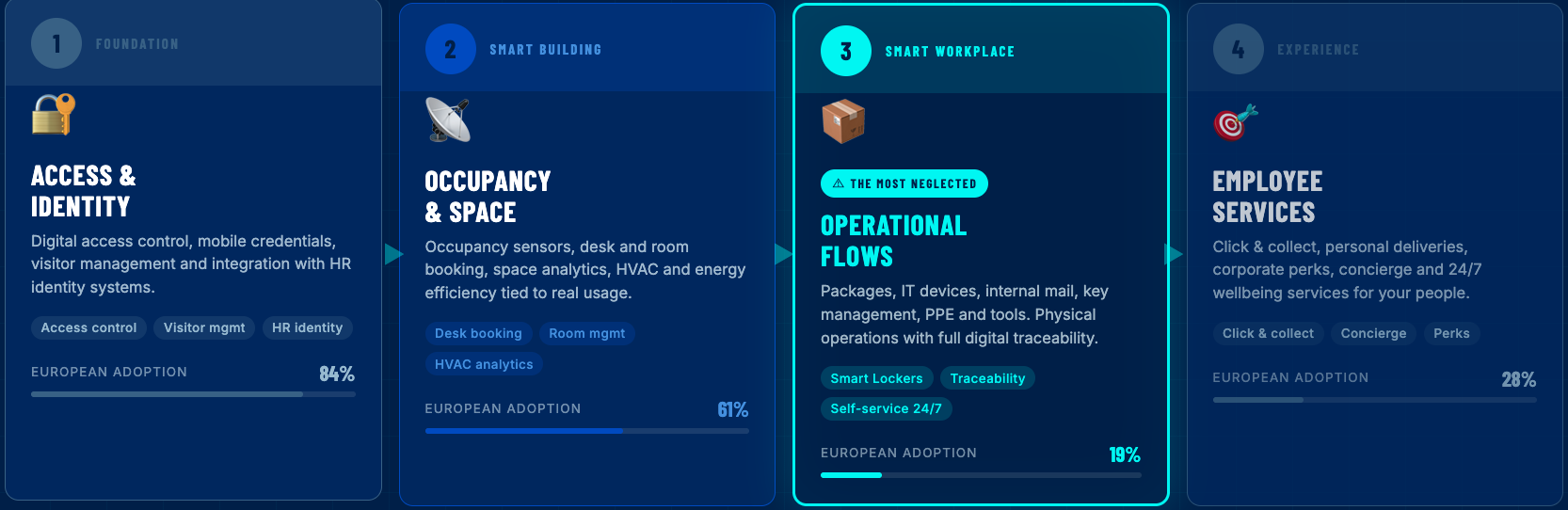
A realistic 18-month roadmap for a corporate office starting from a partially digitized baseline looks like this:
Months 1–3 — Audit and quick wins on Layer 1 and 2. Consolidate access control on a single platform, integrate visitor management with identity systems, deploy occupancy sensors in meeting rooms and collaborative zones. The goal: auditable entry and real occupancy data.
Months 10–14 — Extend Layer 3 to specialized flows. Add temperature-controlled lockers (2–8 °C) for unstaffed canteens, night shifts and catering; device charging zones for shared equipment (PDAs, tablets, handhelds); lost & found; and locker-based workflows for facilities and maintenance teams.
Months 15–18 — Build Layer 4 employee services on top. With operational flows digitized and auditable, layer on employee-facing services: personal package reception, click & collect for corporate perks, concierge-style deliveries. Because Layer 3 is already digital, Layer 4 becomes a user experience problem, not an operational one.
This sequence matters because each layer builds on the previous one. Deploying Layer 4 employee services on top of a manual Layer 3 creates a polished app that still generates complaints when packages go missing or laptops aren't ready on time.
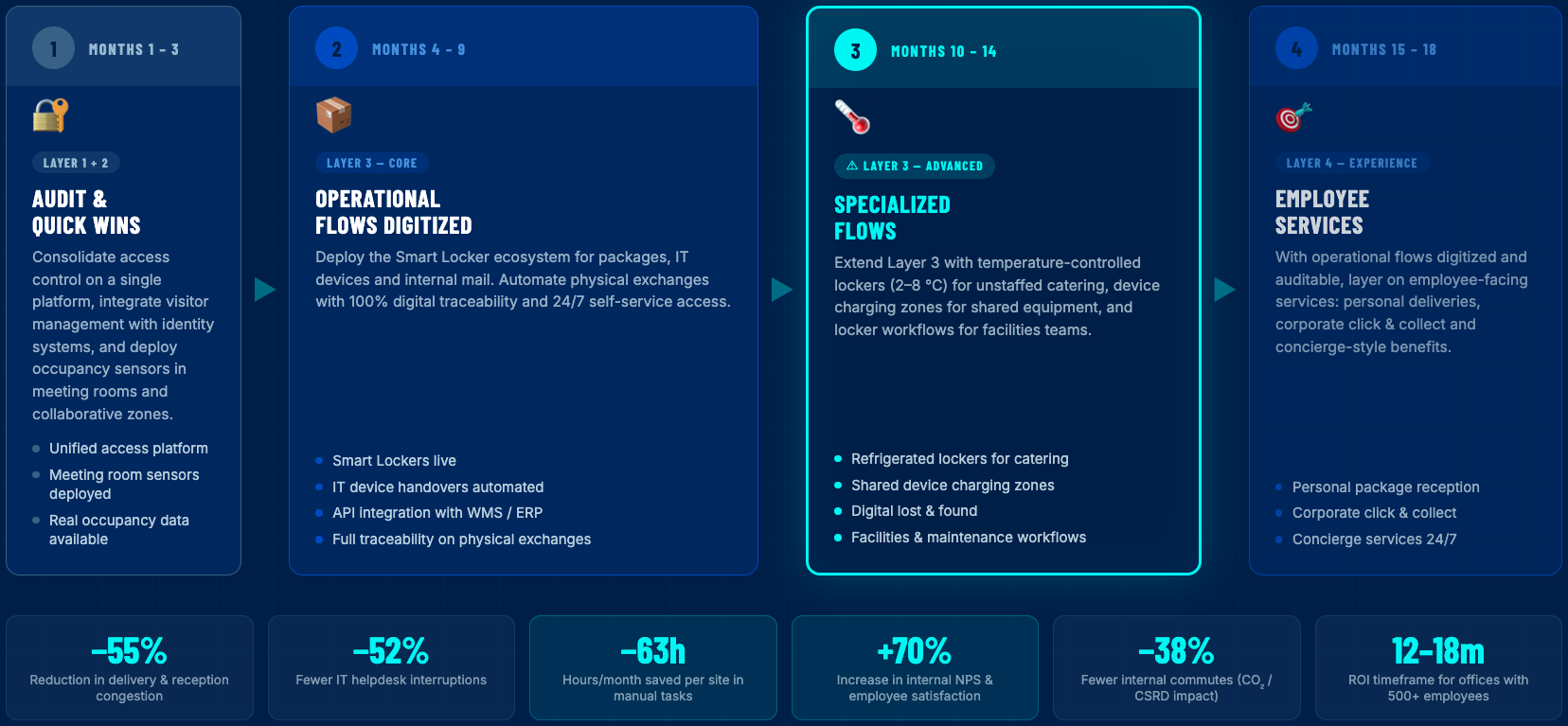
The business case for digitizing the full stack — and especially Layer 3 — is measurable. The benchmarks observed in Columat enterprise deployments across Corporate clients are:
These KPIs are not aspirational. They are the baseline outcome when Layer 3 is properly digitized and integrated with the rest of the workplace stack.
For 2026 planning, Facility Management, IT and Workplace leaders should be benchmarking their own operations against these numbers — and specifically asking: how much of my reception, IT and facility staff's time is spent on manual physical tasks that should not exist in a digitized workplace?
What is the difference between a Smart Building and a Smart Workplace?A Smart Building uses technology to optimize the physical infrastructure: HVAC, lighting, energy, occupancy, access control. A Smart Workplace uses technology to optimize how people use the space: desk booking, package handling, IT devices, catering flows, locker services. Smart Building is about the asset; Smart Workplace is about the people and the processes.
In what order should a corporate office digitize its operations?The correct order is: Layer 1 (access and identity) → Layer 2 (occupancy and space) → Layer 3 (operational flows like packages, IT devices, internal mail) → Layer 4 (employee services like catering, perks, 24/7 lockers). Most offices skip Layer 3 and go from Layer 2 straight to Layer 4, which explains why many digital workplace initiatives fail to deliver ROI.
Why is Layer 3 (operational flows) the most neglected in corporate offices? Because these flows — packages, device handovers, internal mail, key management — are traditionally handled manually by reception, IT or facility staff, they are invisible in the budget and have no natural owner in the technology stack. Most CIOs focus on SaaS platforms and most Facility leaders focus on building systems. No one owns the physical operational layer, which is why 36% of operational time is still lost on manual physical tasks.
What is a Smart Locker ecosystem and how does it fit into workplace digitization?A Smart Locker ecosystem is a network of connected, modular lockers combined with management software and open APIs that digitizes physical exchanges inside a company. It handles package reception, IT device lifecycle, internal mail, tool handovers, temperature-controlled catering and employee services — all with 24/7 self-service, end-to-end traceability and zero manual intervention. Columat is an example of a European Smart Locker ecosystem designed specifically for Layer 3 operational flows.
How do Smart Workplace platforms integrate with Microsoft 365, SAP or ServiceNow?Modern Smart Workplace platforms operate through open APIs that connect with corporate identity systems (Azure AD, Okta), productivity suites (Microsoft 365, Outlook), ITSM platforms (ServiceNow), and ERPs (SAP, Oracle). This allows events like a package arrival, a device handover or a locker reservation to trigger workflows in existing enterprise tools, avoiding the creation of data silos.
What ROI can a corporate office expect from digitizing Layer 3 operational flows?Typical outcomes in enterprise deployments include a 55% reduction in reception congestion, 38% reduction in internal commutes, 52% reduction in IT helpdesk interruptions, 63 hours per month saved per site in manual tasks, and a 70% increase in internal NPS. The ROI is realized in 12–18 months for offices with 500+ employees.+
.png)